Case study
WarehouseFlow
How a paper-based outbound operation moved onto a platform the warehouse used every day. I wrote the requirements, designed the workflow and owned the testing.
- My role
- Requirements, workflow design, testing, pilot rollout
- Built with
- AI coding tools (Gemini, Cursor, Codex) wrote most of the code
- In production
- April – August 2026
- Users
- ~10 daily: warehouse workers and office staff
- Stack
- Firebase · Vercel · daily API import from the company WMS
Quick read: 1 · 2 · 3 · 6 (~3 min)
01
Before: outbound ran on paper
The operation handled B2B fulfillment for 50+ accounts and 1,000+ SKUs: 1,000+ orders a day, up to 3,000 at peak, shipping to Best Buy, Costco, Walmart and Target under each retailer's routing guide.
Orders were printed on paper and handed to workers. That caused six problems:
Orders were hard to read.
Some were handwritten, others densely printed, and the format changed by source and destination.
Progress was invisible.
There was no way to tell how far an order had gotten.
Mistakes were easy to miss.
An extra or missing order was hard to notice.
Orders could be missed.
An order could slip through and miss its shipment.
No data to plan the day.
The daily workload was hard to forecast, and labor and processing time were hard to analyze.
Workload was hard to see.
There was no clear view of how work was spread across the team.
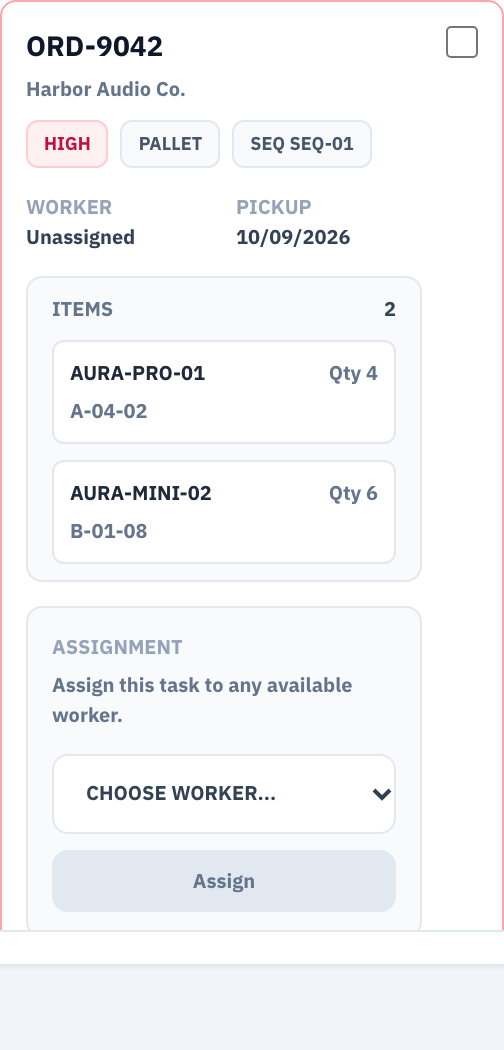
ORD-9042
02
The system at a glance
Every feature sits somewhere on this map. Section 3 walks one order through it.
Standard order
- Company WMS · daily import
- Order pool
- Pick
- Pack & scan
- Dimensions & weight
- Ready
- Outbound schedule
- Shipped
Retail wave (section 4) · joins at Ready
- Batch pick · several POs
- Sort & label by DC / PO
- Palletize per DC
- Dimensions & weight per pallet
- Ready
Managers, throughout: live dashboard · exception queue with per-stage time limits · nightly and weekly reports by email
03
Follow one order
One standard order, from import to departure. The demo is this same order.
1 Imported, then in the pool
The day's orders arrive from the company WMS and land on one board, in the same layout.
What the import checks
Each order comes with SKUs, bin locations, quantities and notes, and gets a result: created, skipped or failed. Duplicates are skipped, and an order with missing detail fails instead of showing up empty. The manager sees it on the board with its customer, priority and stage.
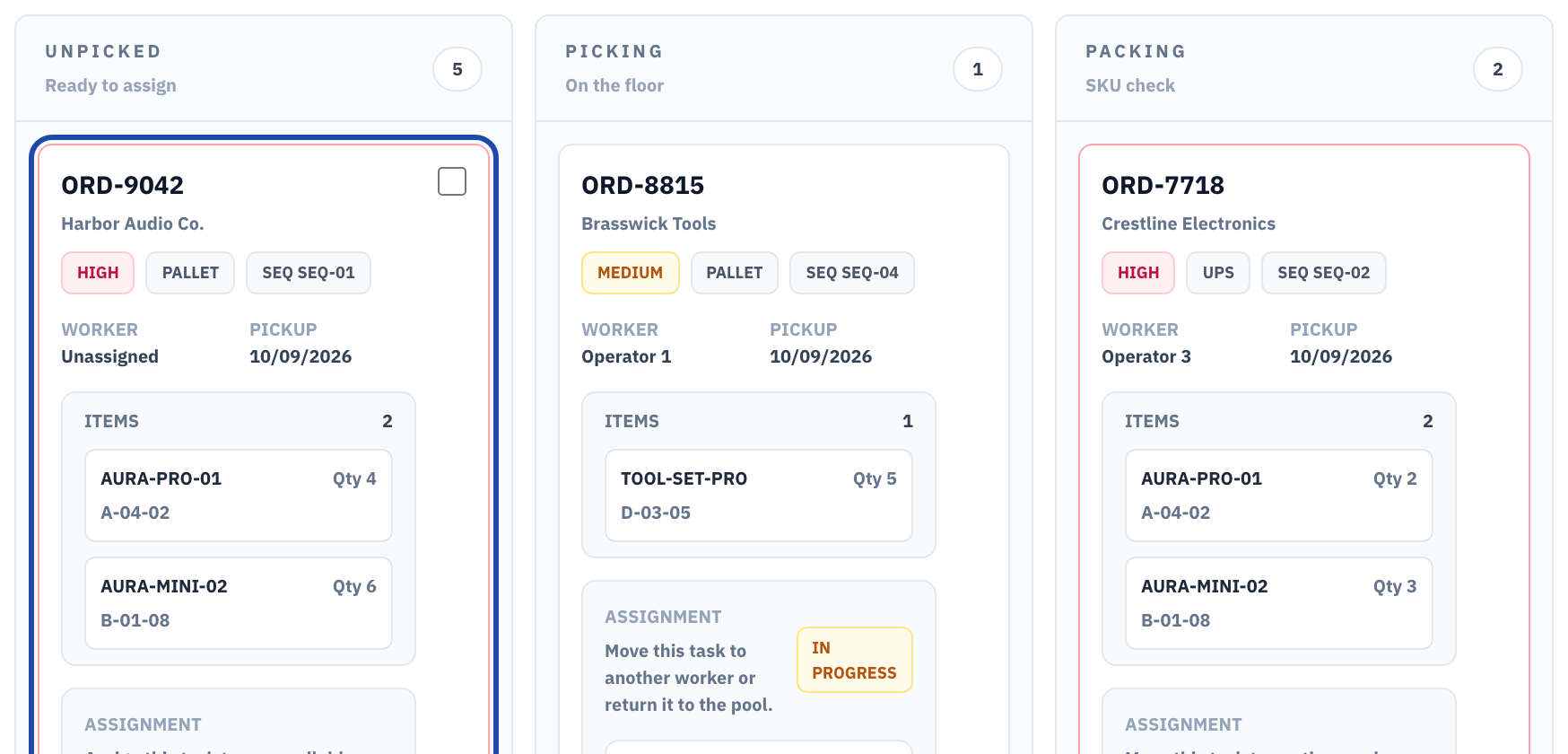
Imported orders land on the board in one layout (ORD-9042 outlined). 2 Assigned, then started
The clock starts when the worker presses Start, not when the task is assigned.
Who starts the task
The manager assigns it, or a worker claims it from the shared pool. Work can be paused, and a reassigned task keeps the time already spent on it.
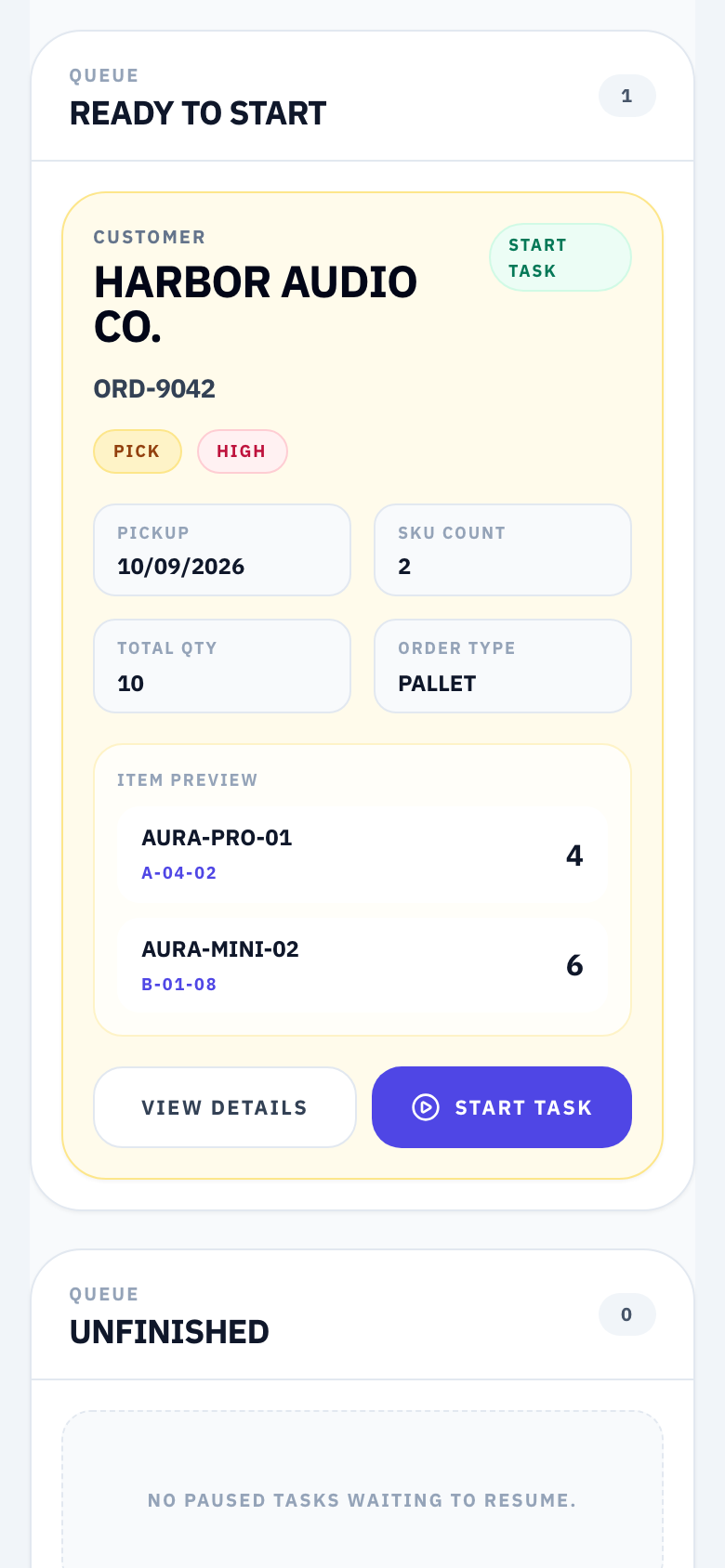
The clock starts at Start, not at assignment. 3 Pick
The worker's screen shows each bin location and quantity.
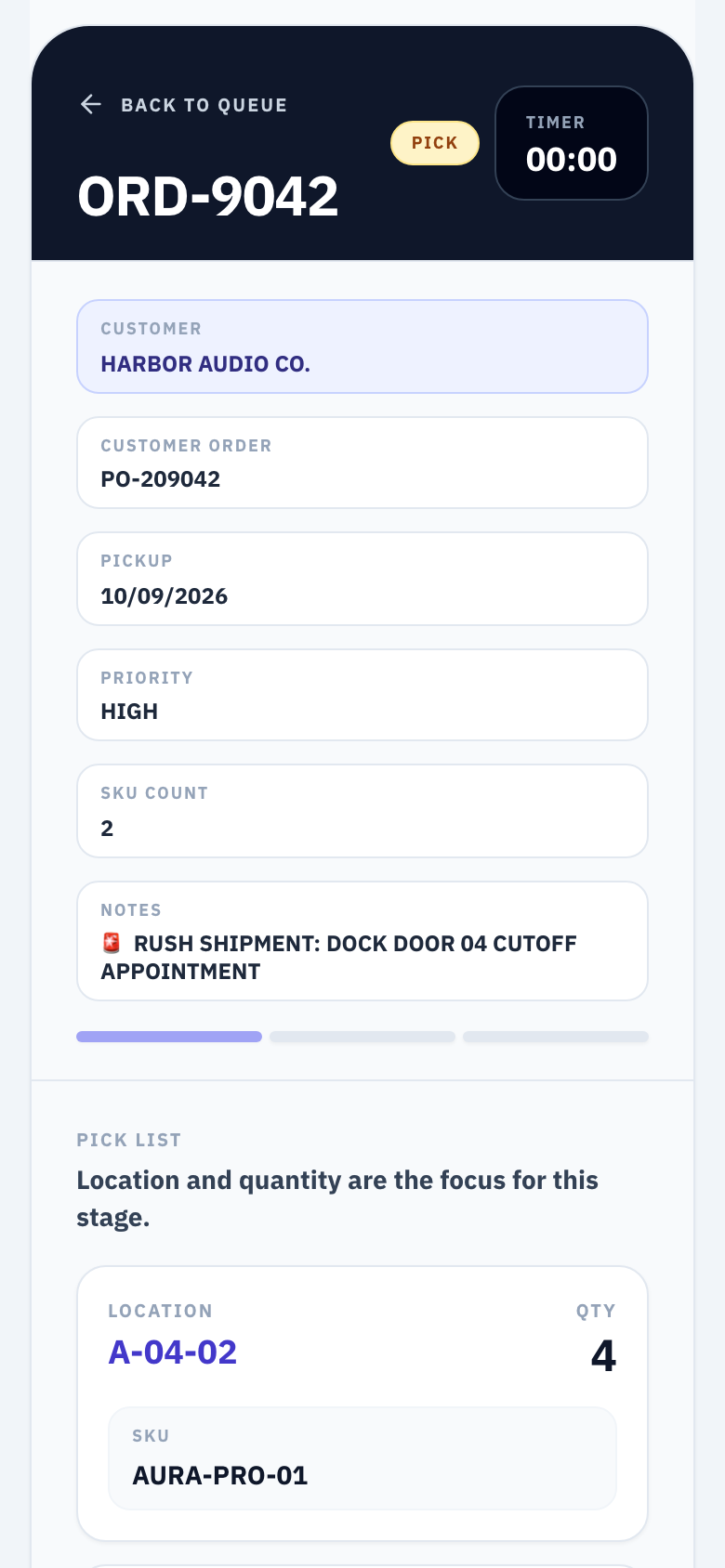
Bin location and quantity, read from a phone. 4 Pack and scan
Each SKU is scanned at packing, and a wrong one is blocked.
How the check works
Each distinct SKU is scanned once, and the task can't be completed until every SKU checks out.
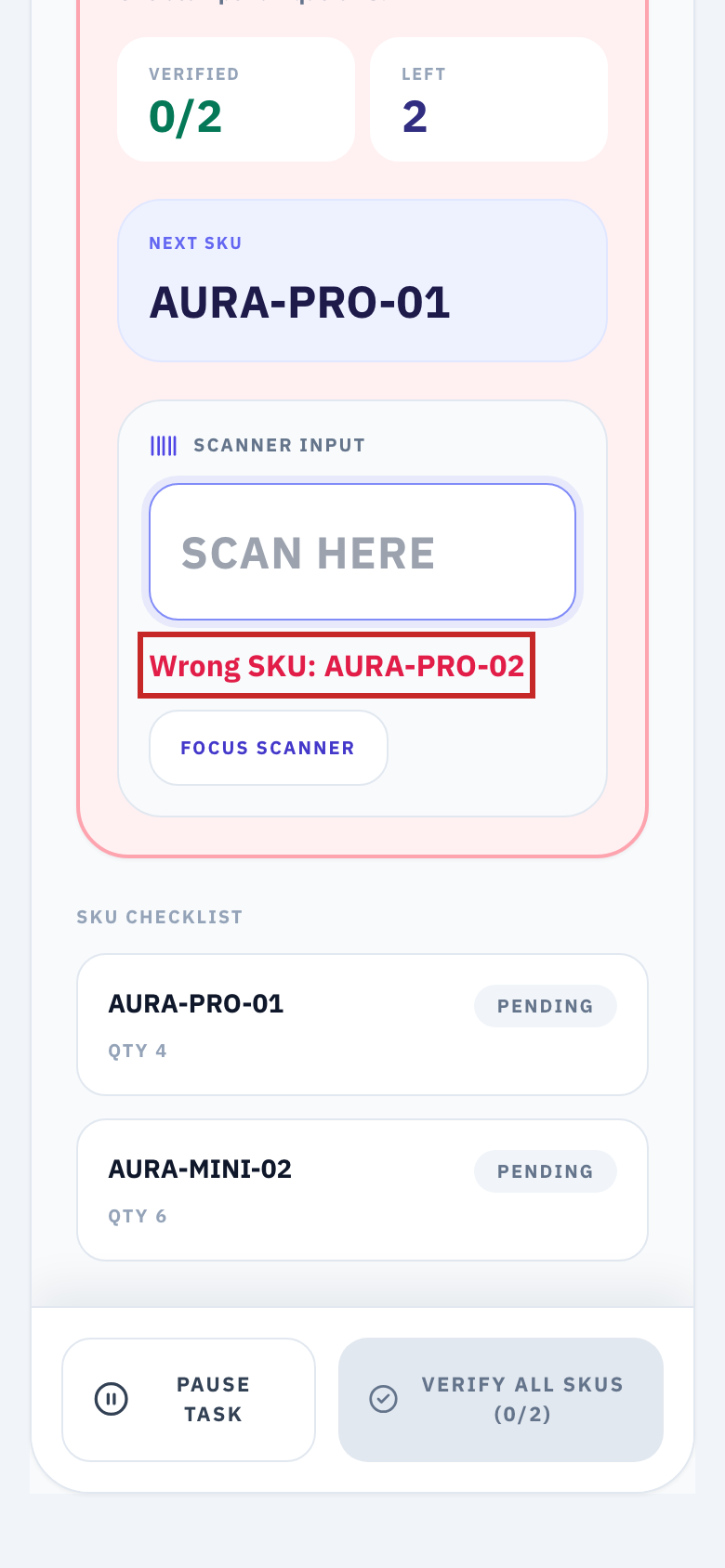
A look-alike SKU is blocked at packing (outlined in red).
5 Dimensions & weight, then Ready
When packing is done, and dimensions and weight if the order needs them, the order shows Ready.
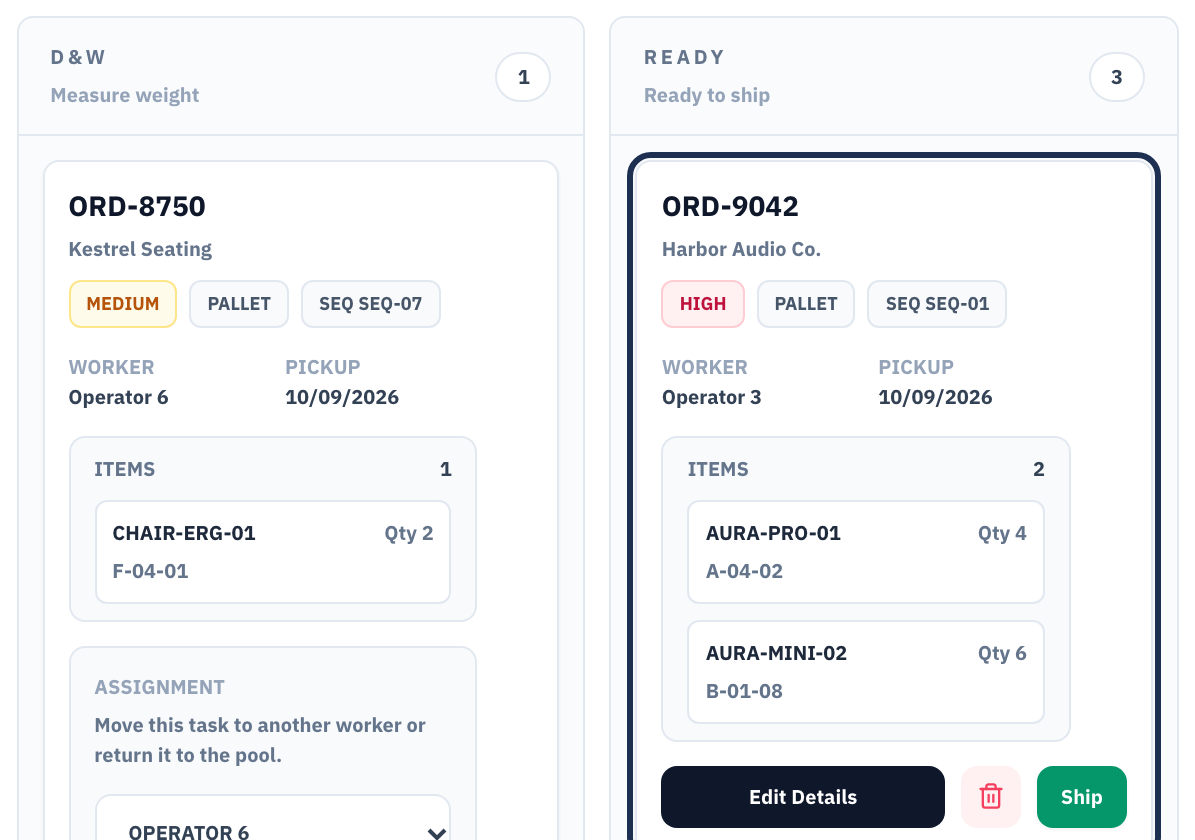
The order reaches Ready (outlined). 6 Matched to the outbound schedule
The shipping schedule checks the order against live progress on the floor.
What the flags mean
Every order is flagged as ready, in process, at risk, overdue or unlinked.

The schedule row reads Ready because the floor says so. 7 Shipped and reported
The order moves to Shipped. Every night, the platform emailed an operations summary to my manager and me.
Nightly operations summary
Today on the floor
- Orders shipped
- 42
- Ready for tomorrow
- 18
- In process
- 7
- Open exceptions
- 2
Attached: detail by worker, customer and task (CSV)
The nightly summary email (illustration, fictional numbers).
04
The harder case: a retail wave
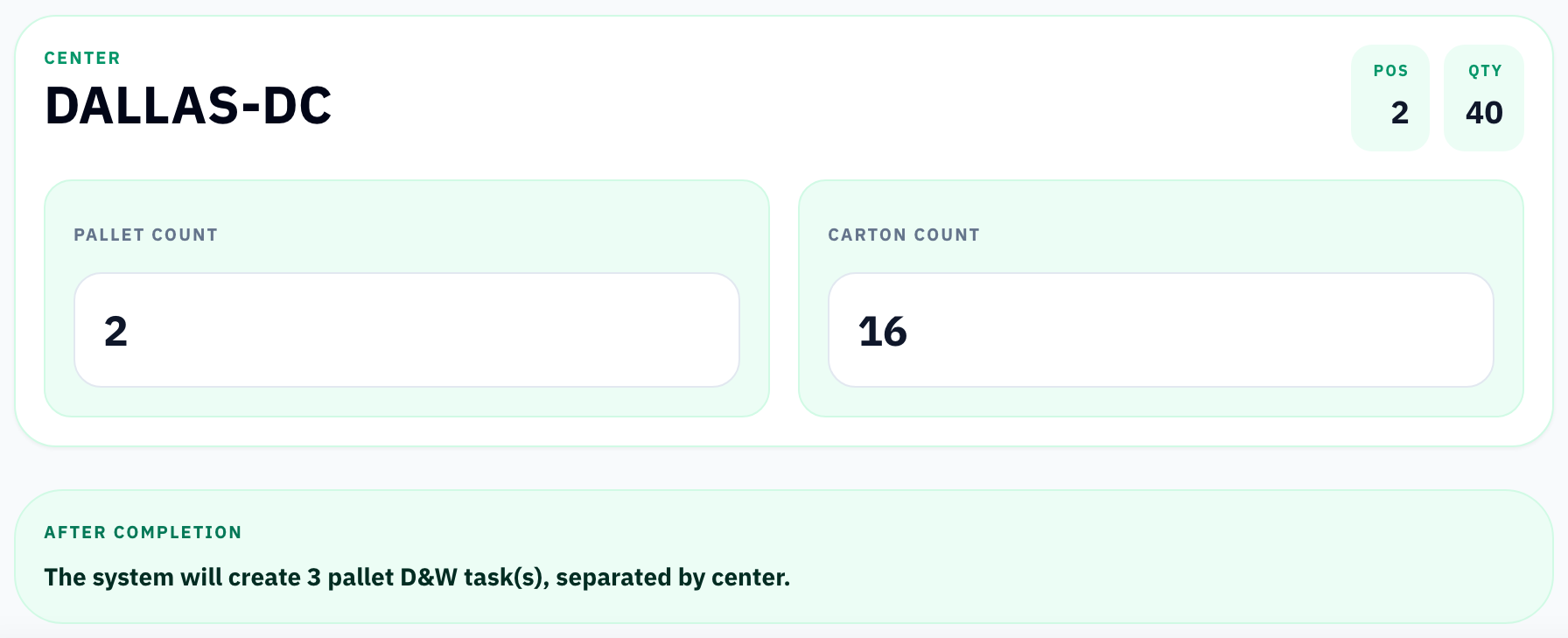
Retail orders for Walmart, Target and Best Buy shipped to several distribution centers under each retailer's routing guide. A simplified example: 3 POs bound for 2 distribution centers.
- 1
Batch pick. One pick task covers all 3 POs.
- 2
Sort & label. Items are grouped and labeled by distribution center and PO.
- 3
Palletize. Pallets are built per distribution center: Dallas DC, 2 pallets; Atlanta DC, 1 pallet.
- 4
Dimensions & weight. One task per pallet: 3 tasks.
05
How I worked
I proposed every change, wrote the requirements and tested every release myself. AI coding tools wrote most of the code.
Where the requirements came from
From problems I dealt with every day running outbound.
Read more
I directed daily outbound operations, so the requirements came from problems I dealt with every day. I turned each one into a requirement, a workflow change or a process fix.
Why build it
The WMS stored the orders but couldn't run the floor.
Read more
The old process ran on printed orders handed to workers, so progress, volume and completion were hard to track, and there was no data for labor or customer- and SKU-level analysis. The existing WMS stored the orders but couldn't run the floor: no task tracking, no scan checks, and no way to use its data. So I built the layer it was missing.
Rollout
Piloted with one crew; issues fixed on the spot.
Read more
I piloted it with one crew. I demonstrated it, they used it while I watched, and I fixed issues on the spot. The team had been asking for a system, so getting people to use it was not the hard part. Daily users were warehouse workers and the office colleagues who handed work over to me.
How I tested
I tested every change by running the real process end to end, checking the data integration, delays and API responses.
A data-quality fix
Orders with missing detail failed the import instead of arriving empty.
Read more
The company WMS sometimes returned an order with no line detail, and the first version created an empty order, with no customer and no SKUs. I changed the rule: an order with missing detail now fails the import and is listed as failed, and re-importing fills it in.
What changed, and why
Mar 2026
Worker task screens, SKU scan check at packing, order import from the company WMS. Paper sheets were hard to read, and wrong or missing items were hard to catch.
Apr 2026
Launch. Board built around order progress, so anyone could see where every order stood. Orders with missing detail rejected at import, so an import that looked successful couldn't create an empty order. Assigning separated from starting, with pause, so processing times measured work, not waiting. Reassignment keeps elapsed time, because people were often moved between tasks.
May 2026
Shared order pool with a suggested next order, to cut time spent waiting for assignments. Scanner-friendly worker screens. Daily report by email, because management wanted a daily summary. Retail waves palletized by distribution center, because large retail orders shipped to several DCs under each routing guide.
Jul 2026
Outbound schedule linked to live warehouse progress. The shipping plan and the floor's actual progress didn't line up, which risked missed orders.
One requirement, written down
The packing rule from section 3, rewritten as a user story with acceptance criteria.
As a packer, I need the system to stop me from packing the wrong item, so the customer gets exactly what they ordered.
Show acceptance criteria
- Given a standard order with two distinct SKUs, when I scan a SKU that is not on the order, then the scan is rejected with "Wrong SKU" and nothing is recorded.
- When I scan each distinct SKU on the order once, then each one shows as verified.
- Until every distinct SKU is verified, Complete Packing stays disabled.
- Scope: each distinct SKU is checked once; units are not counted one by one.
06
Results
- 0missed orders, April–August 2026, including Prime Day 2026
- Hundreds → 1,000+daily orders, no added headcount, every shipment on time
- 1–2 hrsof daily admin work saved
- ~10daily users
| Before | After |
|---|---|
| Orders were hard to read | Every order in one consistent layout: SKU, bin location, quantity, notes. |
| Progress was invisible | Real-time status for every order, replacing paper status checks. |
| Mistakes were easy to miss | Import results flagged skipped and failed orders; the pack scan blocked wrong SKUs. |
| Orders could be missed | Zero missed orders from April to August 2026, including Prime Day 2026. |
| No data to plan the day | Processing times recorded by the platform became part of my daily workload forecast and labor plan. |
| Workload was hard to see | Worker progress and bottlenecks visible in real time. |
Also: nightly operations summaries and weekly management reports, emailed automatically.
07
Looking back
If I built it again, I would add three things from the start:
- Real sign-in and role-based permissions, so each person sees and changes only what their role needs.
- Database access rules from day one, enforced by the database itself.
- Automated tests alongside each change, so each release is checked before it reaches the floor.
08
Walk the same order yourself
The demo is the real interface with fictional data. Watch the walkthrough, or follow the same order through 7 guided steps yourself, about 2 minutes.